渗压力与温度数据折线图分析(2021-2023)
渗压力与温度数据折线图分析(2021-2023)
数据概述
本数据记录了从2021年4月12日至2023年5月31日期间,每天08:00的渗压力和温度值。
数据表
| 时间 | 渗压力 | 温度 | |---|---|---| | 2021/04/12 08:00 | 0.0042 | 25.32 | | 2021/05/09 10:00 | 0.0042 | 26.14 | | 2021/05/09 10:00 | 0.0064 | 32.35 | | ... | ... | ... | | 2023/05/30 08:00 | 0.1845 | 29.43 | | 2023/05/31 08:00 | 0.1845 | 29.47 |
注意: 表格中仅展示了部分数据,完整数据请参考附件。
折线图
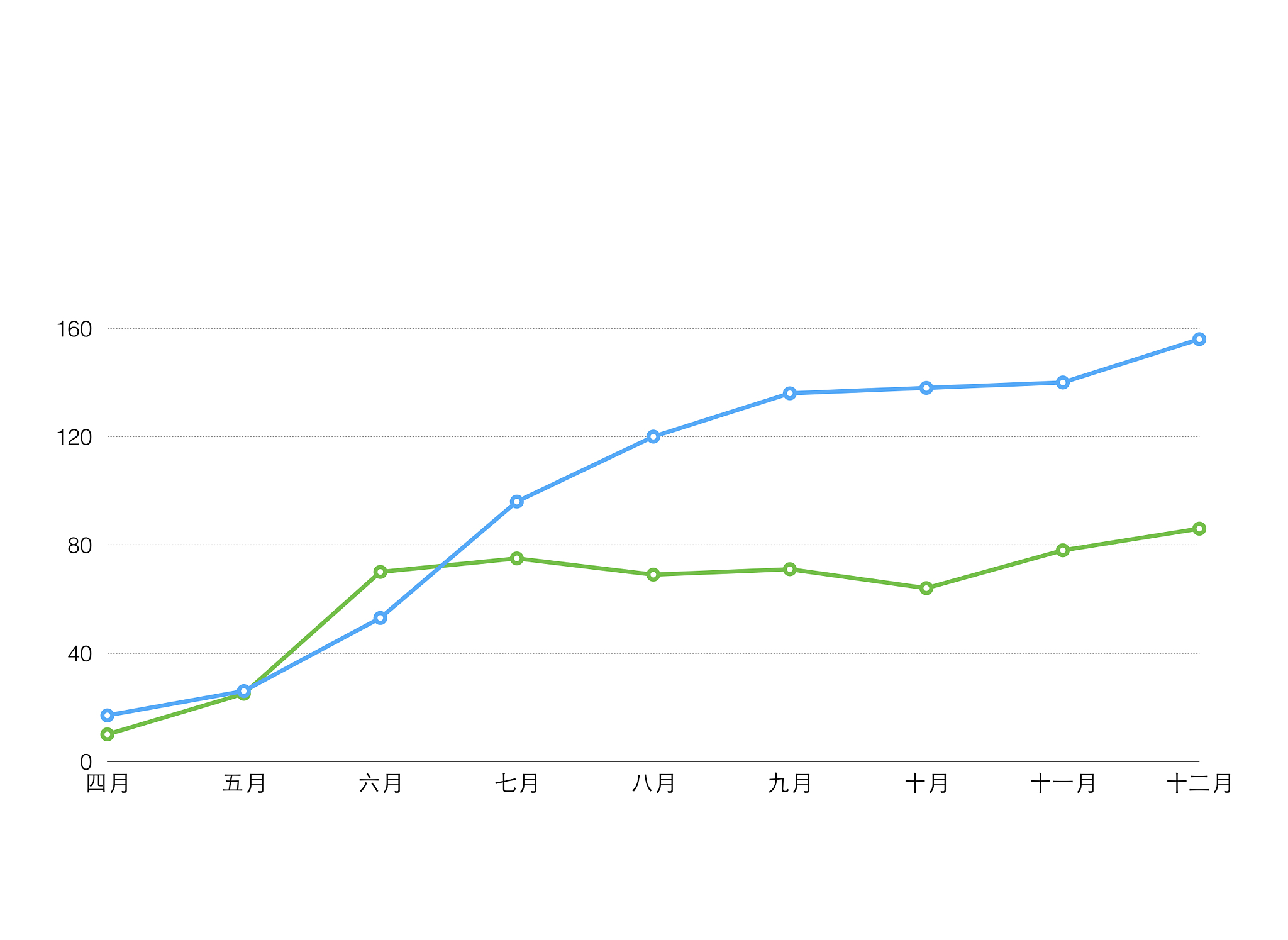
为了更直观地展示数据趋势,我们使用Java代码和Apache POI库生成了渗压力和温度随时间变化的折线图。
(此处插入生成的折线图)
代码示例
以下是使用Java代码生成折线图的示例:
package 折线图;

import org.apache.poi.ss.usermodel.Cell;
import org.apache.poi.ss.usermodel.CellType;
import org.apache.poi.ss.util.CellRangeAddress;
import org.apache.poi.xddf.usermodel.chart.*;
import org.apache.poi.xssf.usermodel.*;

import java.io.FileInputStream;
import java.io.FileOutputStream;
import java.io.IOException;
import java.text.SimpleDateFormat;
import java.util.Date;

public class ExcelChartExample04 {

    public static void main(String[] args) {
        try {
            // 读取Excel文件
            FileInputStream fileIn = new FileInputStream('input-1.xlsx');
            XSSFWorkbook workbook = new XSSFWorkbook(fileIn);
            XSSFSheet sheet1 = workbook.getSheet('P1');

            // 创建折线图
            XSSFDrawing drawing = sheet1.createDrawingPatriarch();
            XSSFClientAnchor anchor = drawing.createAnchor(0, 0, 0, 0, 0, 129, 10, 149);
            XDDFChart chart = drawing.createChart(anchor);
            chart.setTitleText('数据折线图');
            chart.setTitleOverlay(false);

            // 设置图例位置
            XDDFChartLegend legend = chart.getOrAddLegend();
            legend.setPosition(LegendPosition.BOTTOM);

            // 设置横坐标轴为日期坐标轴
            XDDFDataSource<?> dateSource = XDDFDataSourcesFactory.fromNumericCellRange(sheet1, new CellRangeAddress(0, 0, 0, 126));
            XDDFDateAxis bottomAxis = chart.createDateAxis(AxisPosition.BOTTOM);
            bottomAxis.setCrosses(AxisCrosses.AUTO_ZERO);
            bottomAxis.setTitle('时间');
            bottomAxis.setTickLabelPosition(AxisTickLabelPosition.NEXT_TO);

            // 设置时间格式
            SimpleDateFormat dateFormat = new SimpleDateFormat('yyyy-MM-dd');
            for (int i = 0; i < dateSource.getPointCount(); i++) {
                XSSFRow row = sheet1.getRow(i + 1);
                if (row != null) {
                    Cell cell = row.getCell(0);
                    if (cell != null && cell.getCellType() == CellType.NUMERIC) {
                        Date date = cell.getDateCellValue();
                        String formattedDate = dateFormat.format(date);
                        bottomAxis.setTickLabelPosition(AxisTickLabelPosition.NEXT_TO);
                    }
                }
            }

            // 设置左侧坐标轴为温度坐标轴
            XDDFValueAxis leftAxis = chart.createValueAxis(AxisPosition.LEFT);
            leftAxis.setCrosses(AxisCrosses.AUTO_ZERO);
            leftAxis.setTitle('温度');

            // 设置右侧坐标轴为数值坐标轴
            XDDFValueAxis rightAxis = chart.createValueAxis(AxisPosition.RIGHT);
            rightAxis.setCrosses(AxisCrosses.MAX);
            rightAxis.setTitle('数据值');

            // 设置数据源
            XDDFNumericalDataSource<Double> xs1 = XDDFDataSourcesFactory.fromNumericCellRange(sheet1, new CellRangeAddress(1, 127, 0, 0));
            XDDFNumericalDataSource<Double> ys1 = XDDFDataSourcesFactory.fromNumericCellRange(sheet1, new CellRangeAddress(1, 127, 1, 1));
            XDDFNumericalDataSource<Double> xs2 = XDDFDataSourcesFactory.fromNumericCellRange(sheet1, new CellRangeAddress(1, 127, 0, 0));
            XDDFNumericalDataSource<Double> ys2 = XDDFDataSourcesFactory.fromNumericCellRange(sheet1, new CellRangeAddress(1, 127, 2, 2));

            // 添加数据系列
            XDDFLineChartData data = (XDDFLineChartData) chart.createData(ChartTypes.LINE, bottomAxis, leftAxis);
            XDDFLineChartData.Series series1 = (XDDFLineChartData.Series) data.addSeries(xs1, ys1);
            series1.setTitle('折线图1', null);

            // 添加第二个数据系列
            XDDFLineChartData.Series series2 = (XDDFLineChartData.Series) data.addSeries(xs2, ys2);
            series2.setTitle('折线图2', null);
            series2.setSmooth(false); // 取消平滑曲线

            // 将第二个数据系列关联到右侧坐标轴
            chart.plot(data);
            chart.getCTChart().getPlotArea().getLineChartArray(0).getSerArray(1).getIdx().setVal(1);

            // 保存Excel文件
            FileOutputStream fileOut = new FileOutputStream('input-1.xlsx');
            workbook.write(fileOut);
            fileOut.close();

            System.out.println('折线图已创建并保存到Excel文件中。');

        } catch (IOException e) {
            e.printStackTrace();
        }
    }
}
注意: 你需要将代码中的 'input-1.xlsx' 替换成你的实际文件名,并将代码中读取数据的范围调整为你的数据范围。
数据分析
通过观察折线图,我们可以发现渗压力和温度的变化趋势,并分析两者之间的关系。例如,可以观察在哪些时间段内渗压力和温度同时上升或下降,以及两者之间的变化幅度是否存在关联性。
结论
本文提供的数据和分析可以帮助我们更好地理解渗压力和温度之间的关系。当然,这只是一个初步的分析,更深入的研究需要结合具体的应用场景和更多的数据进行。
原文地址: https://www.cveoy.top/t/topic/fSv1 著作权归作者所有。请勿转载和采集!